Your property manager, your deals and your money, in one place.
Custom AI systems for investors who own 5+ properties and use a property manager or operators. Fixed price, first module live in about 3 weeks, and a system you own.
Fixed scope. Fixed price.Agreed before work begins
Your systemYours to keep
From the first conversation to your system
What happens when we work together?
Three steps, with a clear outcome at each one.
1
Free Portfolio Review
See where everything lives today.
Free · 30 minutes
We walk through your properties, your property manager or operators, your deals and your numbers, and where each one lives today. Together, we pinpoint where AI fits and where it does not.
You leave withYour top 3 blind spots and a one-page plan of what to build first, within 24 hours. No commitment to build.
Your starting point
✓Your portfolio
Properties, markets and strategies
✓Your current tools
What works. What needs connecting.
✓Your biggest blind spot
What you can’t see today without asking
2
Design & build
Agree the scope. Then build.
First module live in about 3 weeks · Fixed scope · Fixed price
We start with what costs you most. You see mockups before we code, with the system designed around your portfolio and the tools you and your property manager already use.
You leave withA written proposal before any work begins: the price, the scope, what is included, and what is not.
A clear agreement
✓The scope
Your package, clearly defined
✓The plan
Mockups before code
✓The price
Agreed in writing before we begin
3
Running it
Put it to work. I keep it running.
Monthly, with OS Care
Your system works where you do: your inbox, your phone, or a portfolio view. Hosting, the AI and fixes are on me.
You leave withOne monthly plan. No per-user seat fees.
What stays with you
✓Your data
The information running your portfolio
✓Your access
You decide who gets a login and what they see
✓Your workflows
Built around how your business runs
Built around the way you work
Where does your system live?
In the tools you already use. Your inbox, your chat, or a custom portfolio view. We connect what works and build what is missing.
Your existing information
PadSplit exports
Financial records
Property manager updates
CO
In your inbox
The important updates, ready to review.
A daily brief brings together what changed, what needs your attention, and what to expect this week.
Portfolio changes
Open items needing attention
What is coming up this week
Illustrative workflows. The tools and connections for your build are defined in your proposal.
Packages
Built around your portfolio, not a template.
Every investor has different blind spots, so every Investor OS is custom. I can build whatever your portfolio needs. The modules below are examples I already run in my own portfolio or built for other investors. In your Free Portfolio Review, we pick what to build first.
How every build works
Your foundation + first module, live in about 3 weeks. Your secure portfolio app with logins and roles (admin, editor, viewer) for you, your partners or your property manager, plus the module that costs you most.
One week of adjustments. You use it on your real portfolio, and I fine-tune it.
Add modules as you grow. Each new module usually takes about 2 weeks, depending on how complex it is.
Pick from these, or ask for something new
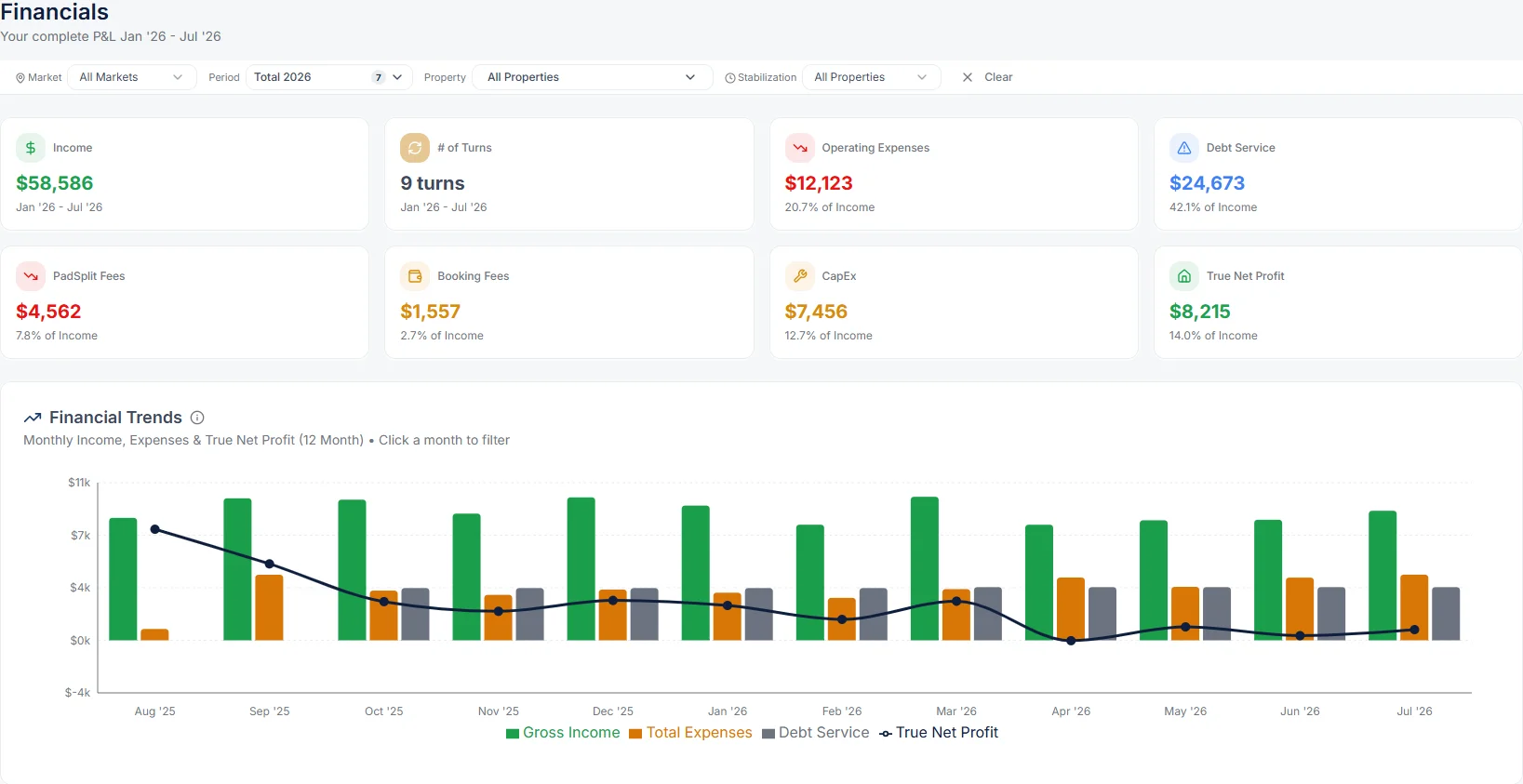
Portfolio P&L: true net per property after platform fees, management fees, repairs and non-payment.
Deal pipeline: new deals scored against your buy box before you open a property.
Off-market deal hunter: leads from Podio or BatchLeads underwritten automatically, with a cash-on-cash score and the max offer that hits your target return.
Property & PM hub: a page per property, recurring services with overdue flags, vendors, door codes and quick lookups.
Repair & warranty history: what was fixed, what you’ve spent and what’s under warranty, so you can decide repair or replace.
Tenant requests & messages, sorted by AI: maintenance requests and tenant messages, categorized, with repeat issues spotted.
AI assistant on your phone: ask for any portfolio detail on Telegram or in the app, and log repairs and tasks on the go.
Owner daily brief: what changed, what needs your decision and what’s coming up.
Documents & deadlines: insurance, leases, permits, loans and warranties, with reminders before they’re due.
CapEx & budget: planned vs actual spend per property.
Strategy views: coliving, long-term rentals and more, side by side.
Every module here is in the live demo; most run in real portfolios today. See it in the live demo → Need something that isn’t listed? That’s what custom means.
First module in about 3 weeks, then about 2 weeks per module
Owner Core
5-14 properties
Foundation + 3 modules
First module in about 3 weeks, then about 2 weeks per module
Single Build
One gap first
Foundation + 1 module
About 3 weeks + 1 week of adjustments
Investor OS is for investors who own 5+ properties and use a property manager or operators. It is not a property management tool. Own fewer than 5? Start with Profit Per Pillow or PillowMarkets.
The on-time guarantee
Your foundation and first module are live within 30 days of kickoff, or I keep building at no charge until they are. You approve the mockups before any code is written. If you don't approve them, you don't pay the build fee.
The guarantee needs two things from you: access to your tools and a kickoff call within 5 business days of signing. I don't guarantee rents, occupancy or your property manager's performance, because those aren't mine to control.
OS Care: I keep it running after launch
Monthly plan · quoted with your build
Hosting and AI subscriptions, managed for you
Monitoring and fixes
Up to 3 small changes a month
AI assistant tuning: new message categories and new questions it can answer
A monthly 30-minute review
One new automation each quarter
You never manage servers or AI accounts. Your data stays yours.
Sign by November 11, 2026 and get:
Profit Per Pillow free for 3 months (paid plans are $29 to $149 a month)
A 3-month PillowMarkets pass (normally $97)
A recorded walkthrough of your system for you and your property manager
I take 2 builds before November 11. Builds signed after November 11 kick off December 1.
From investors
What do investors say after a custom build?
P&L dashboard
Before the P&L dashboard, I was looking at the prior month in QuickBooks. The biggest surprise was how much money was being lost to non-payment. Working with Tanya was super easy - she was very responsive and has a solid understanding of the business problems.
Travis S.Coliving real estate investor
Deal Acquisition
Before the Deal Acquisition tool, my VA was screening deals one at a time in a spreadsheet just to tell me which ones were worth a look. Now the scoring and the numbers are there before I open a property, so I only spend time on the ones worth pursuing. The first deal it surfaced is under contract in Georgia, and we have a second offer out.
Christian F.Coliving real estate investor
Off-Market Deal Hunter
A second module for the same investor. Connected to Podio, where BatchLeads leads come in, it underwrites every off-market lead automatically, scores it on cash-on-cash, and shows the max offer that still hits his target return (for example 15% cash-on-cash). Most leads get filtered out before anyone looks, so his VA no longer reviews deals one by one.
Christian F.Coliving real estate investor · second module
How I use it myself
Property & PM hub
I own 2 coliving houses in Jacksonville (13 doors) on PadSplit with a property manager, plus a rental in Philadelphia. Property info lived in emails, spreadsheets, provider sites, and my property manager's texts. When a question came up, I had to hunt. Now, before I approve a repair, I can see what was fixed before, whether it's under warranty, and how much I've already spent on it, so I know whether to repair or replace. Overdue services get flagged so I can ask my PM, and I can ask the bot for a door code or an HVAC filter size from my phone.
Tanya Zorov, Founder, ColivingOps AI
Liftoff Award Winner, 2026 National Coliving Conference
Investor OS is a custom AI system for real estate investors with 5+ properties who use property managers or operators. It connects the tools, data and decisions behind your portfolio (your numbers, your property manager's updates, documents and warranties, your inbox and your acquisition pipeline) into one system, so you stop being the person who pieces it all together.
Is this a property management tool?
No. Your property manager or operator keeps running the properties with their own software. Investor OS sits above operations: it shows you, the owner, what your property manager is doing, where every deal stands, and where the money is, across every property and market.
What does it cost?
Every build is a fixed price, quoted in writing after your Free Portfolio Review, based on the modules you choose and how complex they are. You'll know the exact price before any work begins.
How long does a build take?
Your foundation and first module are live in about 3 weeks, followed by one week of adjustments while you use it on your real portfolio. Each new module after that usually takes about 2 weeks, depending on how complex it is. Every build runs on fixed scope and fixed price, and you see mockups before anything gets coded.
Is there a guarantee?
Yes. Your foundation and first module are live within 30 days of kickoff, or I keep building at no charge until they are. You approve the mockups before any code is written, and if you don't approve them, you don't pay the build fee. The guarantee needs tool access and a kickoff call within 5 business days of signing.
Who runs the system after it is built?
I do. After the one-time build, OS Care is the monthly plan that keeps it running: hosting, the AI subscriptions, monitoring and fixes are all on me, so you never manage servers or AI accounts. There are no per-user seat fees. Your data is yours, and you decide who gets a login.
What is OS Care?
The monthly plan that runs your system, quoted with your build: hosting and AI subscriptions, monitoring and fixes, up to 3 small changes a month, AI assistant tuning, a monthly 30-minute review, and one new automation each quarter.
How many properties do I need before this makes sense?
It is built for investors who own 5 or more properties and use a property manager or operators. A portfolio of 5 to 7 in a single market usually starts with a Single Build or Owner Core. Portfolios of 15 or more across multiple markets usually need Full Portfolio OS.
What happens on the Free Portfolio Review?
It is free and takes 30 minutes. We look at where your numbers, your property manager's updates and your deals live today, and pinpoint where AI fits and where it does not. Within 24 hours you get your top 3 blind spots and a one-page plan of what to build first. There is no commitment to build, and the plan is yours either way. I hold 3 reviews a week.
What if I only want one problem solved rather than a full build?
Start with a Single Build: your foundation plus one module, such as your portfolio P&L, your property & PM hub, or your deal pipeline. It is live in about 3 weeks, plus a week of adjustments. You can add modules later, and everything carries over.
Start with a Free Portfolio Review
Bring your portfolio. Leave with a clear picture.
30 minutes, free. No commitment to build. Your top 3 blind spots and a one-page plan are yours either way.